

DOWNLOAD THE APP TO ENJOY 7 DAYS FOR FREE
Compatible with Android Smartphones, SMart TV, TV Box, TV Stick
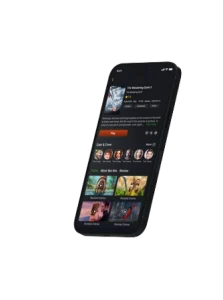
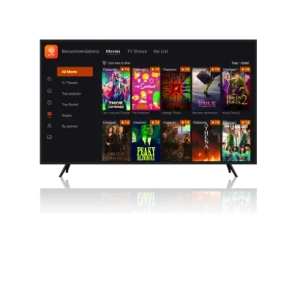
HOW TO INSTALL
THE APP ON YOUR TV DEVICE
Step 1
Access Play Store & download the app “Downloader by AFTV news”.

Step 2
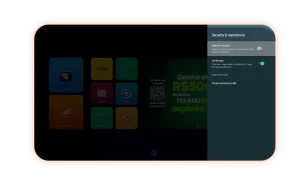
Go to “settings >security & restrictions > enable apps from unknow sources”.
Step 3
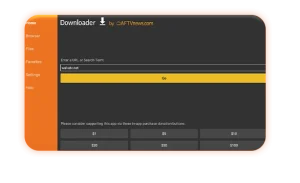
Open “Downloader by AFTV news” and type 8871052 to install the App.
If your TV supports USB flash drives, simply download the APK above, transfer it to your flash drive, and install it on your TV.
You can reach our support staff on WhatsApp for more question.
Choose your favourite plan
But first, enjoy our 7 days Free Trial
Premium Monthly
Live TV + Movies & Series-
Watch on 2 TVs and 2 mobiles at the same time
-
Valid for 30 days
-
Compatible with Android devices*
Standard Monthly
Live TV + Movies & Series-
Watch on 1 TV and 1 mobile at the same time
-
Valid for 30 days
-
Compatible with Android devices*
Standard 6 - Month
Live TV + Movies & Series-
Watch on 1 TV and 1 mobile at the same time
-
Valid for 180 days
-
Compatible with Android devices*
Standard Yearly
Live TV + Movies & Series-
Watch on 1 TV and 1 mobile at the same time
-
Valid for 365 days
-
Compatible with Android devices*
Premium Monthly
Live TV + Movies & Series-
Watch on 2 TVs and 2 mobiles at the same time
-
Valid for 30 days
-
Compatible with Android devices*
Standard Monthly
Live TV + Movies & Series-
Watch on 1 TV and 1 mobile at the same time
-
Valid for 30 days
-
Compatible with Android devices*
Standard 6 - Month
Live TV + Movies & Series-
Watch on 1 TV and 1 mobile at the same time
-
Valid for 180 days
-
Compatible with Android devices*
Standard Yearly
Live TV + Movies & Series-
Watch on 1 TV and 1 mobile at the same time
-
Valid for 180 days
-
Compatible with Android devices*
More than 280 channels 80,000 movies & series

If you want to be a reseller contact us through this e-mail [email protected] or contact us below.
start your venture with WTV!
FAQ
Curious? We’ve got the answers you need.
GETTING STARTED
What does WTV offer?
WTV is the combination of Live TV and VOD designed for Android devices. It has over 60,000 movies and series, together with 220 channels that span across various genres, including sports, news, and entertainment.
The app supports:
- Android TV BOX.
- Android smartphones.
- FireTV/MI TV Stick.
- Android TV including: Haier, JVC, Semp and TCL.
- Chromecast 4, equipped with integrated Android TV.
Where to download WTV?
Follow the steps below to get started with WTV!
It is compatible
with TV Boxes, Android Smart TVs, and Android TV Sticks.
TV Box:
- Go to the Download Link:
Open the internet browser on your TV Box and enter: https://wtvapp.com - Click “Download”: After you enter the link, click “Download” in the navigation bar to navigate to the download section.
- Download: Click “Download” under the “TV Box” to download the APK. It will take a few minutes to download depending on the internet speed, so please be patient.
- Find the WTV APK: Once the download is finished, you can find the Africa WTV APK in the “Downloads” folder of your device.
- Installation: Open your “Downloads” folder and click the APK to install. It will guide you through the whole installation process. If there’s a note prompted, please ensure that you have allowed app installations from unknown sources in the settings of your device.
- Enjoy: You can enjoy the content of the app on your TV Box once it is installed successfully!
Can I get WTV free trial?
Yes, there is a 7-day free trial, so you can check out the app! To be qualified for the free trial, you have to be:
- A new user that hasn’t used the app before.
- Log into the app using a new account on a device that has never used a different account before.
You can get the free test automatically with the device and account. One device/account can have a 7 days free trial at once.
How to register/create an
account?
You can register with your email or cell phone number in the app by follow the following steps.
Register with email:
- Open Africa WTV app and click on the “Profile” button.
- Click the button “Create account“.
- Enter your email address and click the “Send” button to send verification code.
- Go to your email inbox/spam box to find the 4-digit verification code
- Return to the registration page and paste the verification code in the “Verification code” box.
- Set up a password you want and click “Create account“.
All done! Enjoy your WTV!
What to do with the
verification code issue?
If you’re trying to recover your password or create a new account in the app using an e-mail, we advise you to check your “Spam box”, after pressing “Send” to receive the verification code. Usually, verification codes are categorized as spam by the e-mail provider.
How to reset my Africa WTV
password?
To reset your password, please follow the steps below:
- Go to Africa WTV Official website.
- Choose your account type (e-mail or phone).
- Click “Send code” to receive a 4-digit verification code (if your account is an email, please kindly check your spam box).
- Put the 4-digit code you received in the indicated place and create a new password.
Please keep in mind that you can only reset your password and you can’t reset your login account.
How to update the app?
The app will update automatically. When a new version is available,
there will be a notification displayed on the screen with buttons to
enable or not allow the installation.
You can also check if
there is an update available by going to Menu → Info → Check Update.
PLANS & PAYMENT
Where and how to buy a plan?
You can check all of the plans and payment methods on our website https://africawtv.com.
There are monthly and yearly recharge codes available on our website currently. You can pay with PayPal to place the order. The code will be sent to your email address automatically after the payment is made.
Can I have any discount
coupons?
We provide discounts for old customers. After your first successful purchase on our website, you will receive a 5% discount on your next purchase; after your second successful purchase, you will receive a 10% discount on each purchase on all the product.
How to make the Africa WTV
payment?
We are glad that you are interested in our plans! To make a purchase,
you can visit our website and follow the steps to choose and buy
your desired plan.
If you encounter any problems with
payment on our website, please kindly contact our customer service
for support.
Which currency can I use for
payment?
You can make payment with PayPal in USD (Dollar) on our website.
Where to find my recharge
codes?
The codes will be sent to your email address automatically after the payment is made.
Please check your email inbox or spam folder to find your codes.
Note: If the codes do not arrive in your email, please contact
our customer service on Whatsapp for help.
What should I do if I don’t
receive the code after payment?
If you have made the payment but didn’t receive the code in your email. No worry, please contact our customer service support team on WhatsApp and send your order number or email that you used for placing your order. They’ll help to check.
Will the valid period deduct
if I activate more than plans on the same account?
If you top up one more code/plan on the same account of a code/plan
that is active. Don’t worry, you won’t lose the valid days of the
active code/plan.
They will be added to the new code/plan and
the expiration date will be extended accordingly.
Can one code/plan be used on
different devices at the same time?
Yes, one Africa WTV code/plan can be used on 1*TV + 1* Mobile simultaneously.
TROUBLE-SHOOTING
What to do if the app is not
working?
Various factors can lead to instabilities, and resolving them is
frequently straightforward!
If you are encountering any
issues, please follow the steps outlined below. If the problem
persists, kindly reach out to us via WhatsApp, providing additional
details (with video/image).
1. Ensure that your network
connection is stable and restart your device/modem, disconnecting
all cables for a moment. If you are using Wi-Fi, consider connecting
with a network cable to minimize fluctuations.
2. Confirm
that you are using the latest app version. If a new update is
required, perform it on the app by navigating to “Menu” → “Info” →
“Check Update.”
3. Clear the cache and restart after a
few minutes: navigate to “Settings” → “Applications” → “Africa WTV”
→ “Clear Cache.”
NOTE: please remember to write down your
access details (account or recharge code) handy, as the app may
prompt for them again.
Having issues with your
recharge code?
If you have any difficulties on using the recharge code. Don’t hesitate to contact us on Whatsapp for assistant.
BECOME A RESELLER!
How do I become a Africa WTV
reseller?
Thank you for your interest in becoming an authorized reseller of Africa WTV plans. To become a reseller, please add our sales WhatsApp. Our sales representative will guide you with further details on the reseller program.